
Glossary
The following concepts appear throughout the course and may be referenced in milestone assignments.
Data and Analysis
Data Bibliography
A data bibliography is a curated list of data sources that may be useful for a project. Much like a traditional bibliography references publications, a data bibliography references datasets and other information sources. A strong data bibliography describes what each source contains, how it may support project goals, how it can be accessed, and any limitations or concerns that should be considered (ex. costs). Teams often develop data bibliographies before committing to a specific dataset or technical approach.
Exploratory Data Analysis (EDA)
Exploratory Data Analysis (EDA) is the process of examining project data and other available resources to better understand what information is available, how it is organized, and what questions it may help answer.
EDA often involves reviewing data structures and schemas, examining examples of records, generating summary statistics, and creating visualizations that reveal patterns, limitations, and potential data quality concerns.
The goal of EDA is not to build a final solution. The goal is to develop an informed understanding of the project’s starting point so that future decisions, success criteria, and project plans are based on evidence rather than assumptions.
Schema (Data Dictionary)
A schema, sometimes called a data dictionary, describes the structure of a dataset or information source. A schema may document variables, data types, relationships between records, metadata, units of measurement, and file organization.
Understanding a schema is often one of the first steps in exploratory data analysis because it helps a team understand what information exists, how it is organized, and what questions it may be able to answer.
Structured and Unstructured Data
Data can be viewed as existing on a spectrum from highly structured to highly unstructured.
Structured data follows a well-defined organization that makes it easy for computers to store, search, and analyze. Examples include spreadsheets, database tables, survey responses, and scientific measurements where each variable has a defined meaning and location.
Unstructured data does not follow a predefined format and often requires additional processing before it can be analyzed. Examples include notes, emails, social media posts, images, audio recordings, videos, and other free-form content.
Many real-world datasets fall somewhere in between. For example, scientific images, research reports, log files, and JSON documents may contain both structured and unstructured components.
Understanding the level of structure in a dataset is often an important part of exploratory data analysis (EDA) because it influences how data can be stored, processed, visualized, and analyzed.
Automated Machine Learning (AutoML)
Automated Machine Learning (AutoML) refers to software tools and workflows that automate parts of the machine learning process, including algorithm selection, hyperparameter tuning, model evaluation, and model comparison.
Examples include TPOT, Auto-Sklearn, H2O AutoML, and many cloud-based machine learning services.
Many AutoML systems are based on the idea of Combined Algorithm Selection and Hyperparameter Optimization (CASH), where the algorithm choice and its hyperparameters are selected simultaneously rather than as separate steps.
AutoML is often useful for establishing a strong baseline and exploring multiple candidate solutions before investing time in manual model development.
Project Management
Minimum Viable Product (MVP)
A Minimum Viable Product (MVP) is the simplest end-to-end version of a solution that can be demonstrated and evaluated.
The purpose of an MVP is not to solve every aspect of the problem. Instead, it demonstrates that the major components of the project work together and provides a foundation for future improvements. Successful MVPs reduce open loops by replacing assumptions with evidence.
Getting to a working MVP early in the project is a very strong way for teams to guarantee success in open ended problems.
Open Loops
Every project contains uncertainties.
An open loop is a question, assumption, risk, or unresolved issue that could affect project success. Examples include unknown data quality issues, missing community partner requirements, technical uncertainties, evaluation methods, resource limitations, project scope questions, and success criteria that have not yet been fully defined.
Strong teams identify open loops early and develop plans to close them throughout the semester. A common mistake is to ignore open loops and hope they resolve themselves. Another is to spend all available time investigating open loops without making progress on known tasks.
A closed loop is something where there is a clear path to a solution and no obvious unknowns likely to block progress.
Next Step
A next step is a specific action that can be started immediately without additional planning or prerequisites.
Strong next steps are concrete, achievable, and have a clear definition of completion. For example, “improve the project proposal” is vague, while “spend 30 minutes drafting the project proposal outline and share it with the team” is a well-defined next step.
Breaking large tasks into clear next steps is often an effective strategy for closing open loops and maintaining project momentum.
Selection Matrix
A selection matrix is a decision-making tool used to compare multiple options against a common set of criteria.
Typically, rows in the matrix represent candidate options and columns represent measurable criteria used to evaluate those options. The criteria may be weighted to reflect their relative importance to the project.
Many project decisions do not have a single obvious answer. A selection matrix helps teams avoid decision paralysis by providing a structured process for comparison. It also creates documentation that can be shared in the project appendix to explain how and why a decision was made.
The goal is not to find a perfect answer, but to make decisions transparent, systematic, and justifiable.
Success Criteria
Success criteria describe how a team will determine whether the project is making meaningful progress and how the final solution will be evaluated.
Success criteria should focus on outcomes rather than activities. The best success criteria are specific, measurable when possible, and connected to community partner needs. When appropriate, teams should establish a baseline and measure progress relative to that baseline rather than selecting arbitrary targets.
Software Development
Reproducibility
Reproducibility is the ability for another person to obtain the same results using the same data, code, and documented procedures.
In software projects, reproducibility means that someone outside the team can install and run the project successfully. In data science and scientific research, reproducibility means that another person can regenerate the analyses, figures, results, and conclusions that support a project’s findings.
Reproducibility builds trust. If a result cannot be recreated, it becomes difficult to verify, maintain, improve, or build upon. Many course milestones are designed to improve the reproducibility of your project through documentation, installation instructions, and repeatable workflows.
Robustness
Robustness is the ability of a system to continue working reliably under a variety of reasonable conditions.
Robust software can handle changes in inputs, different computing environments, growing datasets, and common user mistakes without failing unexpectedly. Robust systems are not expected to handle every possible situation perfectly, but they should fail gracefully and provide useful feedback when something goes wrong.
A project may be reproducible without being robust. Software that only works on a specific computer may be reproducible if every step is documented, but it is not robust. Strong projects strive to be both reproducible and robust.
Application Programming Interface (API)
An Application Programming Interface (API) is a defined way for one piece of software to interact with another.
An API specifies what functionality is available, what inputs are expected, and what outputs will be returned. Well-designed APIs allow software components to be used without requiring users to understand their internal implementation.
Python Package API
A Python package API consists of the functions, classes, methods, and modules that a developer can import and use directly within their own code.
import pandas as pd

df = pd.read_csv("data.csv")
The functions and classes provided by Pandas are part of the Pandas API.
Many course projects focus on developing reusable package APIs because they are generally easier to test, document, maintain, and reuse than other interfaces.
Web API
A Web API provides functionality over a network using web protocols such as HTTP.
Instead of importing a package, software communicates with the API by sending requests and receiving responses. Common examples include weather services, mapping services, AI services, and database-backed applications.
Web APIs are most useful when multiple applications, systems, or users need shared access to the same functionality.
Relationship Between Package APIs and Web APIs
Students sometimes assume that “develop an API” means creating a web service. In most course projects, this is not the case.
A well-designed software project often begins with a package API that contains the project’s core functionality. If remote access is needed later, a Web API can be built on top of the package API.
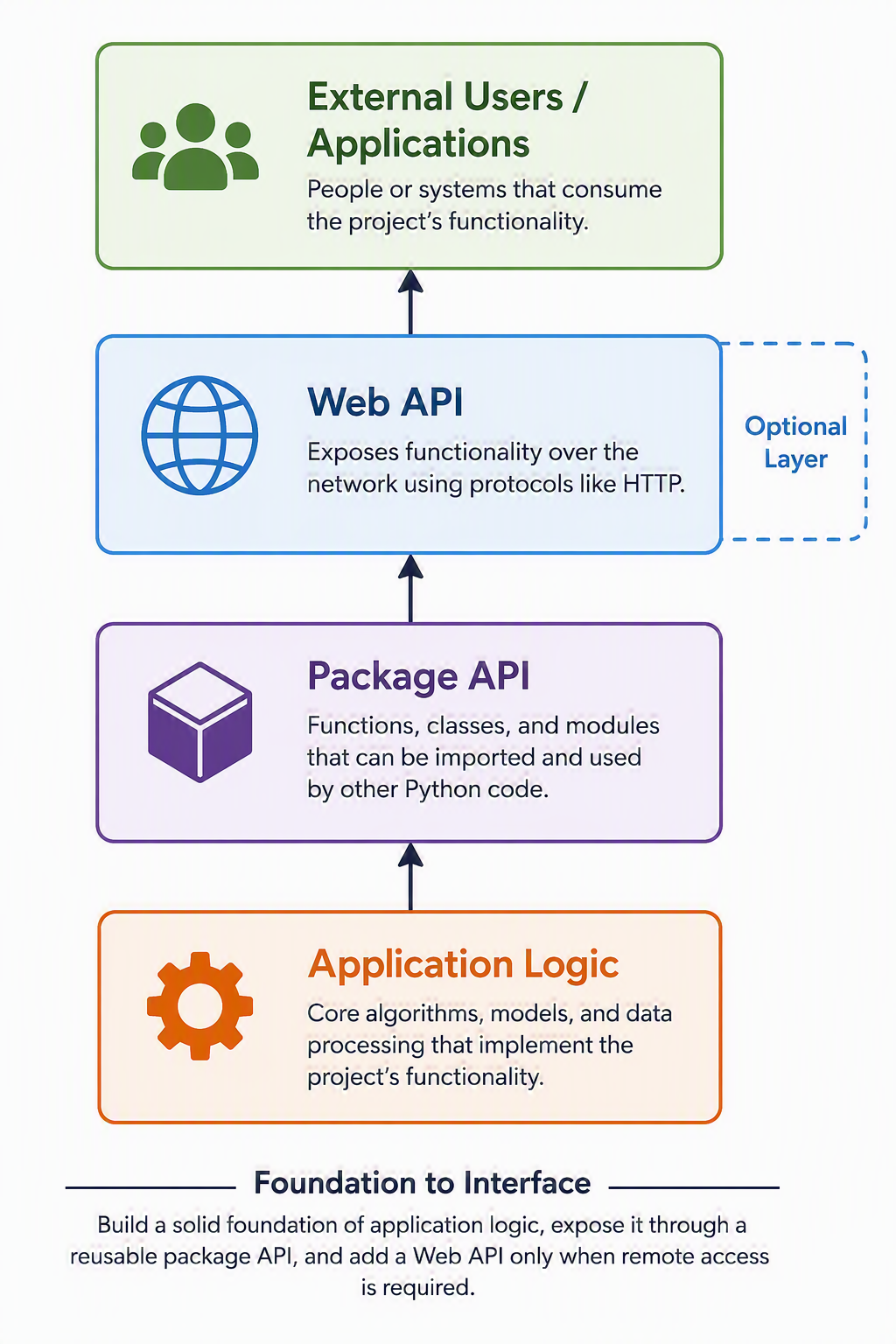
This approach avoids duplicating code and allows the same functionality to be used both locally and over a network.
Unless a project has a clear requirement for network communication, teams should generally focus on developing a clean package API before considering a Web API.
Professional Practice
Professionalism
Professionalism is the consistent practice of helping your project, your teammates, your community partner, and the course community succeed.
Professionalism is closely tied to engagement. Students demonstrate professionalism through communication, preparation, follow-through, initiative, reliability, technical contributions, documentation, and support of others.
Professionalism should not be confused with extroversion. Some students demonstrate professionalism through presentations and visible leadership roles, while others demonstrate it through planning, technical work, documentation, mentoring, issue reporting, or project support.
Professionalism is a skill that can be developed through practice and feedback. The goal is not to judge personality, but to help students build habits that contribute to success in project-based environments and future professional settings.