
Day 14 Pre-Class Assignment: Making Predictions Using Data#
Goals for today’s assignment#
Describe the utility of fitting trendlines to data, in the context of making predictions about the future
Use best-fit lines to make predictions about future values
Quantitatively and qualitatively describe how to determine the Goodness of fit for a given line
✅ Put your name here#
1. Predicting Future Trends#
Consider the following dataset showing salinity of water (amount of salt in the water) versus depth for an imaginary body of water:
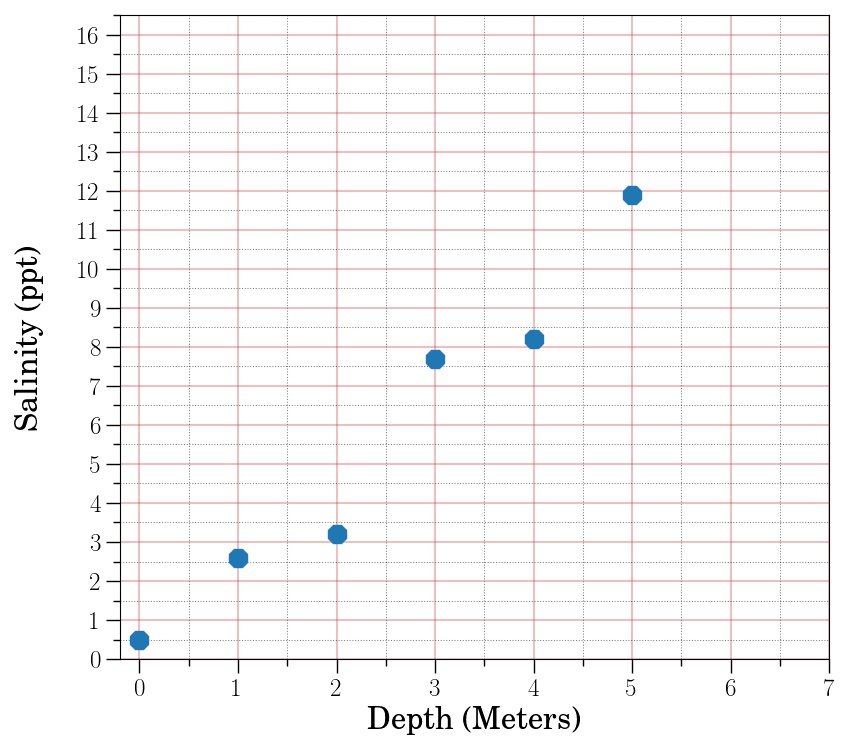
✅ 1.1 What would you guess the salinity would be at a depth of 6 meters? At 7 meters? What makes you think those would be the values?
✎ Put your answer here.
✅ 1.2 Now, make a line connecting the first and last points and continue it out to a depth of 7 meters. Using the line, predict what the salinity would be at a depth of 6 and 7 meters. You may find it useful to hold a straight edge up to your screen (e.g. piece of paper, pen, pencil) to trace out this line.
✎ Put your answer here.
✅ 1.3 How do the values you determined using your line compare with the values you predicted in 1.1?
✎ Put your answer here.
2a: What is Regression?#
In many applications, data depends on other data. This is expressed with dependent variables that depend on independent variables. In the above example, the salinity (dependent variable) might depend on the depth (independent variable). If salinity is linearly related to the depth, we can fit a line through the relationship of these variables.
One of the problems that arises in data science is that the data is never perfect. We often say that the data has “noise” or “fluctuations”. The problem is that we know that some of these fluctuations are not real: they are caused by errors in our measurements or any other factor that is not in our control. We do not want to take those fluctuations literally. In other cases the fluctuations might actually be real, but we don’t want to focus our attention on those details because we simply want the trend. Regression solves this problem by providing a methodology to find a smoother function that is consistent with your data but doesn’t attempt to match every detail, which may or may not be a real signal.
A common form of regression is called simple linear regression. Simple linear regression finds the best line that goes through noisy data. But, there are other forms of regression that we will be interested in. Here are some of the methods we will explore in this class:
Simple linear regression: fitting a best-fit line through a data set
Curve fitting: we might want to fit to some other curve, which you need to supply based on some insight into the data, of arbitrary form; for example, the exponential \(ae^{-t}+ b\)
2b. Determining the Line of Best Fit#
Consider the figure below, which shows the same data set, but with two lines.
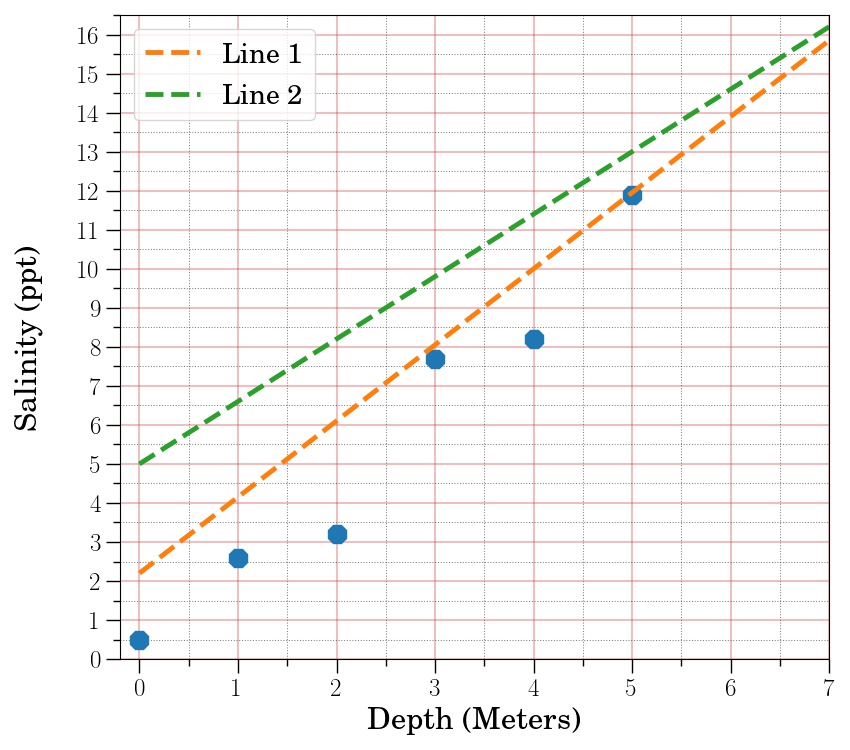
✅ 2.1 Without doing any calculations (i.e., just looking at the figure), do you think the salinity at a depths of 6 and 7 meters will be closer to values in line 1 or line 2? What is it about that particular line that makes you think it will be more accurate in predicting future values?
✎ Put your answer here.
✅ 2.2 Imagine someone asks you to show quantitatively that the line you have selected will be more accurate in predicting future values. What is a way you could quantitatively measure how well a line fits some dataset?
Try to come up with an algorithm–that is, a detailed procedure, like a recipe–for calculating how well a line fits a dataset.
✎ Put your answer here.
✅ 2.3 Now try to apply your algorithm (by hand) to the lines and data from the figure above. Does the line you choose in part 2.1 fit the data the best according to your algorithm?
The data values and the values for the two lines are provided.
import numpy as np

x_data = np.array([0,1,2,3,4,5])
y_data = np.array([0.5,2.6,3.2,7.7,8.2,11.9])
y_values_line_1 = np.array([2.2, 4.15, 6.1, 8.05, 10., 11.95, 13.9, 15.85])
y_values_line_2 = np.array([5., 6.6, 8.2, 9.8, 11.4, 13., 14.6, 16.2])
✎ Put your answer here.
3. Using a Computer to Fit a Line#
In the questions and exercises above, you were asked to think through how one might determine the “best fit” line that matches the data you were presented with. As you might imagine, finding a line of best fit is a very common practice, so there are tools for Python that allow us to do this with code. The one we will use is a function called curve_fit, which is available in the SciPy module.
Note: By “fitting a function”, we mean that there is a function that contains parameters that we can adjust to find the expected values that fit the data the best (hence finding the “best fit”).
As with many Python packages, we need to import curve_fit first! Make sure you review this important command and see how it differs or is similar to other import commands that we’ve used in the course.
# import curve_fit function
from scipy.optimize import curve_fit

# import numpy and matplotlib as well while we're at it
import numpy as np
import matplotlib.pyplot as plt
To use curve_fit, you need a minimum of two things:
A (Python) function that contains the mathematical function you are fitting to your data
A dataset, consisting of x and y values, that you are fitting your mathematical function to.
Letâs use the data from above as an example. We want to use the x and y values to fit a line, which has the following form:
✅ 3.1 What parameters are we adjusting to find the best fit for this function?
✎ Put your answer here.
# Let's visualize the data again

# x and y values
x_data = np.array([0,1,2,3,4,5])
y_data = np.array([0.5,2.6,3.2,7.7,8.2,11.9])

# plot to visualize the x and y data
plt.scatter(x_data,y_data)
To get started with finding our fit, we first define a Python function that contains the mathematical function weâre fitting.
# define the function we want to fit to the data
# the independent variable input goes first, and the parameters follow
def linear_function(x, A, B):
    return A * x + B
We now have the two pieces needed to use curve_fit: the function we’re using and the data we’re trying to fit. Letâs run it and see what we get.
# Use curve_fit by passing in the function, x data, and y data
best_fit_parameters, just_ignore_this_for_now = curve_fit(linear_function, x_data, y_data)
print(best_fit_parameters)
If we look at the documentation for curve_fit, we see that by this calling function, we get two return values by default: popt and pcov. popt contains the best fit parameters. You do not need to worry about pcov for the purposes of this assignment, but you are encourage to read the documentation for a description of what pcov is.
In the code above, popt was stored in the best_fit_parameters variable, and pcov was stored in just_ignore_this_for_now.
If we want to see what our best fit line looks like using our best fit parameters, we can use the following code:
A_expected = best_fit_parameters[0]
B_expected = best_fit_parameters[1]

y_expected = linear_function(x_data, A_expected, B_expected)
✅ 3.2 Give a brief explanation for what the last line of code is doing in the cell above.
✎ Put your answer here.
Now we can try to plot both the data and our best fit model values.
plt.scatter(x_data, y_data, label = "data")
plt.plot(x_data, y_expected, color = "orange", label = "fit")
plt.legend()
4. Determining Goodness of Fit#
✅ 4.1 Compare your the best fit line you just found to the “best fit” line provided in Section 2. Which one appears to fit the data better?
✎ Put your answer here.
✅ 4.2 Try to turn the algorithm you described in part 2.2 for measuring how well a line fits the data into code and apply it to the new best fit line that you just found using curve_fit. How does this value for goodness of fit compare to the one you found in part 2.3?
#Put your code here
✎ Put your answer here.
5. Your turn to use curve_fit!#
Now, you will practice using curve_fit yourself! Below are some \(x\) and \(y\) values, and we want to fit an equation of the following form:
✅ 3.3 What parameters would we adjust to find the best fit for this function?
✎ Put your answer here.
# We want a sin function to approximate these values!
x = np.array([0.00, 0.71, 1.43, 2.14, 2.86, 3.57, 4.28, 5.00, 5.71, 6.43, 7.14, 7.85])
y = np.array([0.34, 1.42, 1.92, 1.23, -0.08, -1.19, -0.82, -0.14, 0.90, 1.77, 1.78, 0.30])

# Visualize the data
plt.scatter(x,y)
✅ 5.1 Fit sinusoidal curve to the x and y dataset. Specify what the best fit parameters are and make a plot showing your best fit line. Some pseudocode is provided for you to help you!
# Define the function

# Run curve_fit on the data

# Use best_fit_parameters from curve_fit to get a best fit curve

# Visualize the plot

##DO NOT ERASE THE LINE BELOW
plt.savefig("task5_1.png")
Part 6. (Time permitting) Reminding ourselves what it means to “model” data#
In a previous pre-class assignment, we paused to spend some time thinking about what we mean when we talk about “scientific models” or “computational models” The idea of “modeling” something is a core component of this course (as the name suggests!).
If you want a refresher on what a model is and how we can use models to understand the world around us, re-watch the following video.
If the the YouTube video doesn’t work, try this MediaSpace link.
Assignment wrap-up#
Please fill out the form that appears when you run the code below. You must completely fill this out in order to receive credit for the assignment!
Congratulations, you’re done!#
Submit this assignment by uploading it to the course Desire2Learn web page. Go to the “Pre-class assignments” folder, find the appropriate submission link, and upload it there.
See you in class!
Copyright © 2025, Department of Computational Mathematics, Science and Engineering at Michigan State University, All rights reserved.